Is Omoggle Safe? What to Check Before Using a Live 1v1 Platform
No live stranger-matching or appearance-competition platform can be described as completely safe for every user. If you are searching for Omoggle or Ommogle, confirm the exact website first, review its current age rules and privacy policy, and understand what camera access and interaction with strangers may involve.
Omogle.net is different. It is an independent, single-user photo-analysis tool. It does not operate the live 1v1 service and cannot confirm that service’s current features, moderation or data handling.
Published 2026-08-06 · Last reviewed 2026-08-06
What people usually mean by “Omoggle”
The spelling may be used for a live appearance-based service or trend in which users are matched for real-time comparison. Product features can change, and similar spellings may lead to unrelated domains. Omogle.net should not publish unverified claims about another operator’s camera use, storage, age verification, moderation or leaderboard rules.
Before using any third-party service, verify the exact domain and read information published by that service. A search-result title, social-media clip or similar name is not enough to establish who operates a site or how it handles data.
The main risks of a live 1v1 appearance platform
Camera and microphone access
Live services may request camera or microphone permission. Users should know when the stream begins, whether audio is enabled, and how to revoke access. Browser permission does not prevent another participant from recording the screen.
Interaction with strangers
Random matching can expose users to harassment, sexual content, manipulation, attempts to move the conversation elsewhere, or requests for identifying information. Blocking and reporting tools reduce risk only when they are visible, effective and actively enforced.
Recording and reposting
A participant may capture video, screenshots, usernames or comments. Content can be reposted outside the original service even when the platform itself offers no download button.
Appearance pressure
Public comparison can encourage humiliation, compulsive checking and harsh ranking. The risk may be greater for minors or users already distressed about appearance. A high score does not make the environment psychologically safe, and a low score should never be treated as meaningful evidence about personal worth.
Age controls and moderation
Users and parents should confirm the current minimum age, how age is checked, what content is prohibited, whether sessions are moderated, and what happens after a report. Omogle.net cannot verify those controls for another platform.
Safety checklist before joining
- Confirm the exact domain and operator.
- Read the current privacy policy and terms.
- Check the minimum age and parental-consent rules.
- Review camera, microphone, location, contact and notification permissions.
- Find the block, report and account-deletion controls before starting.
- Do not reveal your school, workplace, address, phone number or daily routine.
- Assume another participant can record the screen.
- Leave immediately if you see sexual content, threats, harassment or pressure to move to another app.
- Do not use appearance feedback as a reason to harm yourself, diet dangerously or pursue unsupervised procedures.
Does Omogle upload photos?
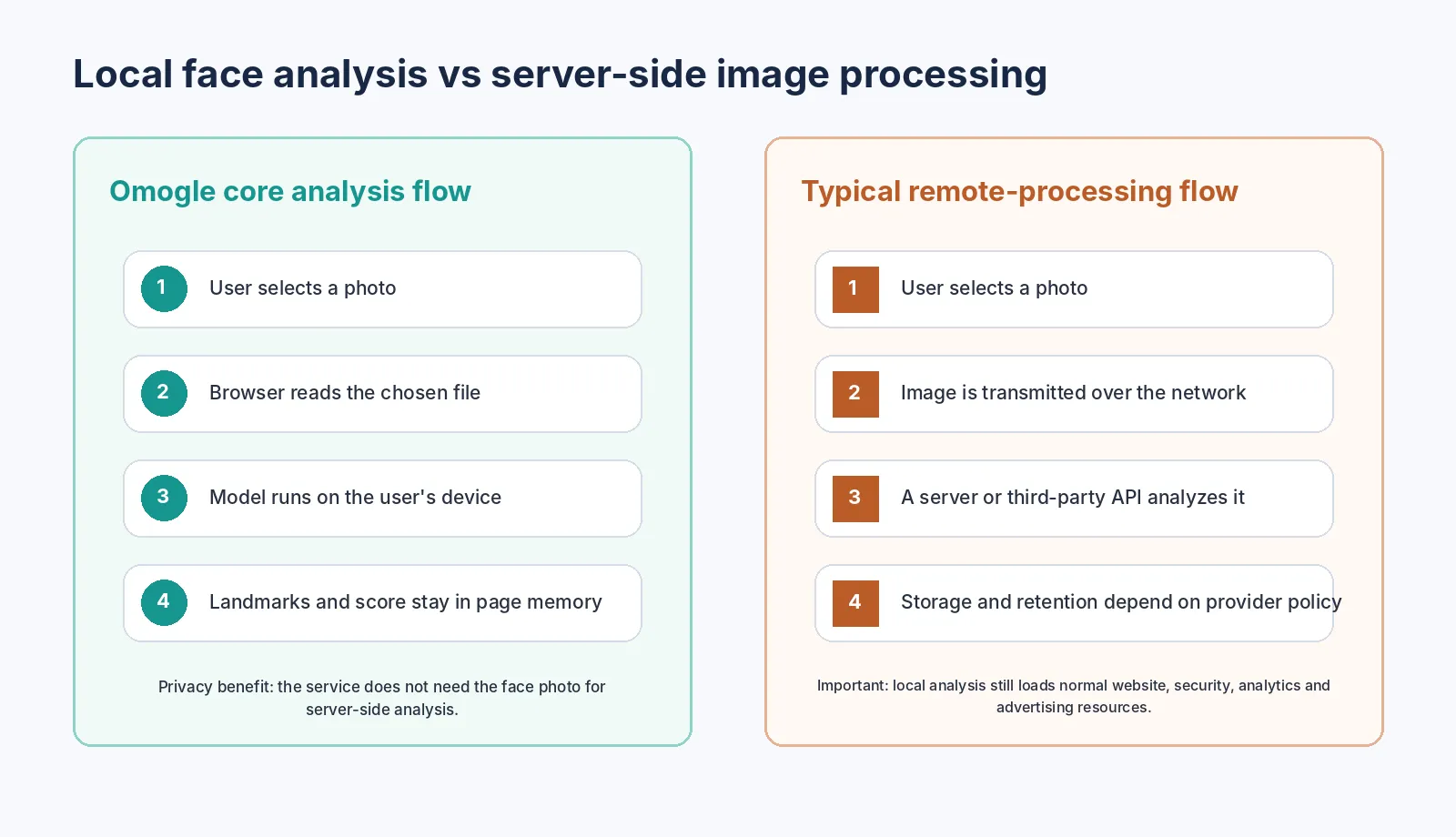
Under the current Omogle Privacy Policy, the photograph selected for the Omogle face-analysis tool is processed with client-side JavaScript. The selected image and resulting facial measurements are not uploaded to Omogle’s servers or sent to a separate face-analysis provider for the core rating flow.
How local browser processing works
A website can download JavaScript and model files to the browser. After the user chooses a file, browser APIs can read that selected file into page memory. A model running on the device can then analyze the pixels and return landmark coordinates to the page without sending the face image to a remote analysis server.
The browser FileReader API is one standard way a page can read a user-selected File or Blob. face-api.js is a library that supports face detection and landmark estimation in the browser. The exact Omogle implementation should remain documented on the Methodology page.
Local analysis does not mean zero network activity
The website still communicates with servers to load and operate. Network requests may include:
- HTML, CSS and JavaScript;
- model files;
- fonts and images;
- hosting and security requests;
- consent-management resources;
- analytics events;
- advertising requests;
- error or performance logs.
Those requests may include ordinary technical information such as IP address, browser type, device data, cookies, referrer and visit time. Omogle must not claim that it collects “no data at all.” The accurate claim is narrower: the selected face photograph is not sent for server-side face analysis under the current implementation.
Does Omogle store the score or facial measurements?
The current Privacy Policy states that the resulting facial measurements are not uploaded to or stored on Omogle’s servers for the core analysis flow. The result can still be saved by the user through a screenshot, download or share action. After the user exports a copy, that copy is controlled by the user and any service to which it is shared.
How to verify image handling
A developer or technically confident user can inspect browser network activity:
- Open Developer Tools and select the Network panel.
- Clear the current request log.
- Select a non-sensitive test image.
- Run the face analysis.
- Inspect new Fetch, XHR and document requests.
- Check whether any request contains the image file, encoded image data or extracted facial measurements.
- Repeat the test after every architecture or third-party-script change.
Model downloads, analytics or ad requests may appear even when the face image remains local. The test should focus on the content of requests, not merely the presence of network traffic.
What would require an immediate privacy update?
- server-side or third-party AI analysis;
- account-based score history;
- cloud backup;
- remote generation of result cards;
- moderation that sends the photo to a service;
- social profiles or public leaderboards;
- model training with user photographs;
- storage of face-derived measurements.
If any of these features is introduced, Omogle must update its code, consent flow, Privacy Policy, Methodology and every page that says photos remain local before deployment — not afterward.
Safer use of any face-rating service
- Use only your own photograph or one you have permission to analyze.
- Do not upload photographs of children to an appearance-rating tool.
- Remove identity documents, addresses and private surroundings from the image.
- Avoid linking a face score to a real name, school or workplace.
- Do not publicly rank or shame another person.
- Stop if the activity becomes upsetting or compulsive.
Frequently asked questions
Is Omoggle completely safe?
Is Omogle.net the same service?
Does Omogle upload my face photo?
Does Omogle use cookies or analytics?
Can another live-platform user record me?
What should parents check?
References
- [1] Omogle Privacy Policy — Product-specific source for local photo handling and ordinary website data.
- [2] MDN FileReader API — Official web-platform documentation for reading user-selected files in the browser.
- [3] face-api.js repository — Official library documentation.
- [4] Omogle Methodology — Source of truth for the active face-analysis implementation.
- [5] Omogle Terms of Service — User rules and limitations; update age and permission language separately if needed.